
Mihon Android App (Wi-Fi Sync)
Stream translated chapters over your local Wi-Fi LAN directly into Mihon, Tachiyomi, and Android comic readers.
1. Overview & Mihon App Download
With the official XianScan Mihon extension (extensions/xianscan-mihon), your local PC acts as a high-speed comic repository over your local Wi-Fi network (or over HTTPS via Cloudflare Tunnels). Read all your translated manga and manhua on Android phones, tablets, or e-ink readers (Boox, Meebook) with zero cloud upload.
Get the Mihon Reader App:
If you don't already have Mihon installed on your Android device:
- Official Website: https://mihon.app/download/
- GitHub Releases: https://github.com/mihonapp/mihon/releases
- (Also fully compatible with Tachiyomi, TachiyomiSY, TachiyomiJ2K, and Aniyomi).
2. Installing the XianScan Extension
Method A: Extension Repository (Recommended)
- In Mihon, open More -> Settings -> Browse -> Extension repos.
- Tap + Add and paste the official repository URL:
text
https://raw.githubusercontent.com/ArbenApura/xianscan-rust/repo/index.min.json- Go to Browse -> Extensions, search for XianScan, and tap Install (tap Trust if prompted).
Method B: Direct APK Download
- Download the pre-built extension APK directly:
- In Mihon, open Browse -> Extensions -> ⚙ (top-right) -> Install from files.
- Select the downloaded APK file and tap Trust if prompted.
3. Connecting Over Local Wi-Fi
- In Mihon, go to Browse -> Sources, and tap the settings icon ⚙ next to XianScan.
- Tap Server address.
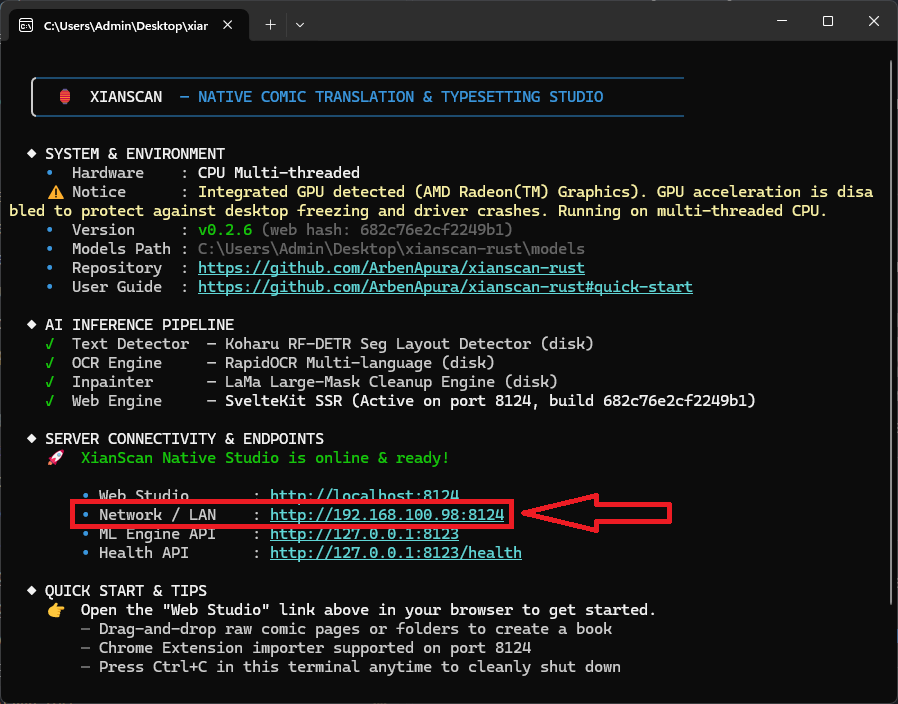
- Enter your computer's local IP address and port 8124 (e.g.
http://192.168.100.98:8124, no trailing slash).
You can find your LAN address printed directly in the XianScan startup terminal banner under Network / LAN:
- In Browse -> Sources, tap the filter icon and enable the Multi language tag (or All globe 🌐 icon).
- Open XianScan under Sources to browse and read your translated library!
(For Mihon REST protocol specifications and building from source, see Extension & Client Architecture).